Case study · UX design · 2022

MAC: booking a school visit to the museum, with the paperwork included

A reservations app for the Museo de Arte Contemporáneo (Universidad Nacional del Litoral, Santa Fe). Research, personas, usability tests and the final screens.
Layered paper relief in ochre and charcoal, hung on a pale wall
Painting of dark blue waves with white crests
Carved plaster ornament above an arched door of the museum building
Photographs from the app prototype: works shown on the exhibition screens and the museum building.
Project
MAC UNL · educational visits app
Role
UX Designer (research → mockups)
When
2022
Method
Interviews, personas, journeys, wireframes, 2 usability rounds
Problem

Teachers can’t book what they can’t justify

Schools in Santa Fe need a formal project, approved by the Ministry of Education, before they can take students anywhere, and it must be filed 30 days ahead. The museum’s booking happened by phone, so teachers never had the information the project needs: exhibition content, duration, capacity, accessibility, schedule.

Persona 1
Claudia, vice-principal

Runs a large school with many groups and time slots. Needs the full logistics to plan one outing for several classes.

Persona 2
Brenda, social worker

Visits with adults with intellectual disabilities. Needs to know if the content fits and if the building is accessible (ramps, wheelchairs, sign language).

Goal
Book and download

Reserve a guided visit and leave with a downloadable file that already contains everything the project form asks for.

Research findings

What two rounds of testing changed

Round 1
  • Exhibition info must show: general description, dynamics, works, price, suggested age, duration, rules.
  • Museum info must show: façade, floor plan, history, staff, purpose, why visit, hours.
  • Download not only the confirmation, but the whole exhibition brief, organized.
Round 2
  • A welcome screen with the façade photo, before login and onboarding, so people recognize the building.
  • Date and time as a direct slot picker plus a calendar of available dates, instead of typed text.
  • Accessibility: proper contrast, caps/contrast toggles, no swipe-only transitions, screen-reader support.
Components

One system for every screen

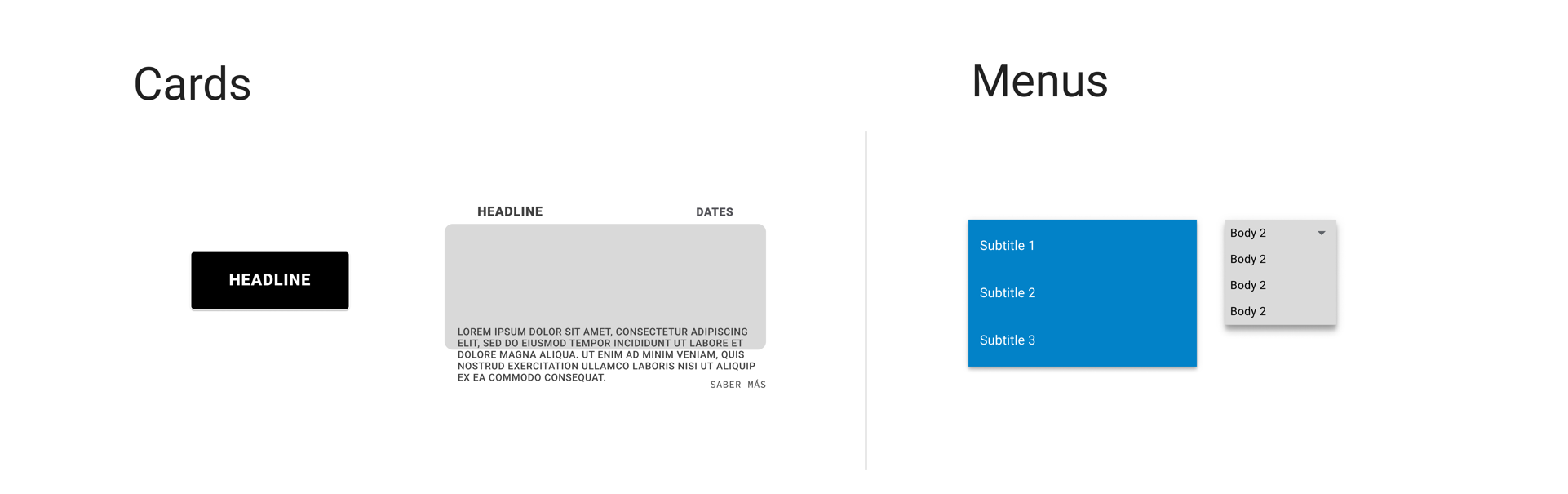
The first version had the right pieces (cards, menus, backdrop, app bar) but mixed sizes, a pure-black contained card and a flat blue menu with no elevation. The final version keeps the museum blue and the façade backdrop, and applies one spec to every component. Measurements and states follow one spec (Roboto, 8 dp grid); the shapes, motion and icons are the museum’s own: arched windows, square edges, thin line icons, a quiet ink wash when you press.
36 dp
Button height, 2 dp square edge
56 dp
Text field height, 12 sp floating label
48 dp
Minimum touch target for every control
4 · 10 · 12 %
Hover, pressed and focus state layers
First version: cards and menus
First version · cards and menus (Figma).
ColorBlue and paper carry the interface, gold marks what is current, clay is for small labels only
Primary#0277BD · white 4.8:1
Primary dark#01579B · white 7.4:1
Primary light#80D8FF · black 13:1
Gold#FFB300 · black 11.7:1
Clay#A4411F · white 6.3:1
Paper#F4EFE6 · ink 15:1
Surface#FFFFFF · ink 17:1
Error#B00020 · white 7.3:1
Ink#1B1A17 · text at 87 / 68 / 38 %
Type scaleRoboto for interface, Roboto Serif for titles
Display · Serif 300 · 44/48
Arte, en tu aula
Headline 5 · Serif 400 · 24/32
Territorios en tránsito
Headline 6 · 20/32 medium
Fecha y horario
Subtitle 1 · 16/24
Visita guiada de 60 minutos, hasta 30 personas.
Body 1 · 16/24
Reservá visitas guiadas para tu escuela o grupo.
Body 2 · 14/20
Edad sugerida: desde 8 años. Accesible en silla de ruedas.
Button · 14/16 medium
Reservar visita
Caption · 12/16
Cupo: 30 personas por grupo
Overline · 11 caps
Muestra · hasta 30/6
Buttons36 dp high · 64 dp min width · 48 dp touch target · state layers 4 / 12 / 10 %
Contained · elevation 2, 4, 8 · press washes in dark blue from the base
Enabled
Hover · 4 %
Focus · 12 % + ring
Pressed · 10 % + wash
Disabled · 38 %
Outlined · hairline in dark blue
Enabled
Hover · 4 %
Focus · 12 % + ring
Pressed · 10 % + wash
Disabled
Text · the underline draws itself
Enabled
Hover · 4 % + underline
Focus · 12 % + ring
Disabled
Floating action, extended action and icon button
FAB · 56 dp arch
Extended · 48 dp ticket
Icon · 48 dp, 1.5 px line
Accessibility
Download
Text fields, selection, chips56 dp fields · 40 dp state layer inside 48 dp rows · 32 dp chips
Hasta 30 por grupo
Ingresá un email válido
Reserva confirmada · 12/5, 10:00
Cards, rows, menu, dialog2 dp edge, arched photo windows, warm elevation 1 · 8 · 24
Layered paper relief in ochre and charcoal
Muestra · hasta 30/6
Territorios en tránsito
Fotografía y video · 60 min · desde 8 años · accesible
Screens

Four screens from the tested flow

Welcome with the façade (added after round 2), the exhibitions list, the booking form with a slot picker and a calendar, and the confirmation that downloads the project file. Each screen is drawn at 375 px wide.

9:41
Museo de Arte Contemporáneo · UNL

Bienvenidos

Reservá visitas guiadas para tu escuela o grupo y descargá todo lo que necesitás para el proyecto de salida.

01 · Welcome
02 · Exhibitions
9:41
Fecha y horario
Reserva para
Territorios en tránsito
Mayo 2022
LMMJVSD 2526272829301 2345678 9101112131415 16171819202122
Turnos disponibles · jueves 12

Cupo: 30 por grupo. Los grupos entran con 15 minutos de diferencia.

03 · Date and time
9:41
Reserva confirmada
Reserva N.º 0412
Territorios en tránsito
Jueves 12 de mayo · 10:00 y 10:15
2 grupos · 48 personas · 60 min · guía incluida
Tu proyecto de salida
  • Ficha de la muestraContenido, obras, dinámica, edad
  • Datos del museoPlano, accesibilidad, horarios
  • Todo en un PDFListo para elevar a dirección
04 · Confirmation and download
Accessibility

Accessibility, built in

Contrast

Primary #0277BD on white is 4.8:1 (and white on primary the same); the darker #01579B is used for small text on paper at 6.5:1. Body text at 87 % ink is about 12:1.

No swipe-only actions

Tabs and calendar work by tap and keyboard; nothing depends on a gesture, as the round-2 findings asked. Every control keeps a 48 dp target and a visible focus ring.

Screen readers and motion

App bar, tabs and bottom nav use native roles; the dialog is labelled; progress reports its value. Motion is short and switches off with the reduced-motion setting.